




Muvi AI
見つけるエフェクト
動画
画像
作品ワークフロー
使用例
アプリ
New
料金プラン
Training Videos

Prepare workplace scenarios for internal training

Generate onboarding, compliance, and skills training videos by describing workplace scenarios.

Module planning · Procedure updates · Workplace context · LMS checks
Create video
Platform 1Platform 2Platform 3Platform 4Platform 5Platform 6
Describe scenes with textSupported image inputsReview before publishing
  • DATACORELIGHTHOUSE

    "A high-tech, 3D isometric animation set in a dark digital void with a glowing grid floor. Four floating islands are shown: a central lighthouse made of glowing blue glass, a digital sphere, a cluster of blue crystals, and a topographical map with a location pin. Bright white data streams flow from the peripheral islands toward the central lighthouse, which begins to pulse with intense blue light. The lighthouse then emits a powerful lens flare at the top, symbolizing data processing and connectivity. Sleek futuristic aesthetic, clean 3D motion graphics, and vibrant blue neon accents."

    VVeo 3.1
    1:1
  • SMARTPHONESHOWCASE

    "A sleek, cinematic product showcase of a modern smartphone. A semi-transparent, grey digital hand holds the dark grey phone against a neutral grey background with subtle floating particles. The camera performs a smooth, close-up orbit and zoom, showing a thumb interacting with a vibrant mobile interface filled with colorful app icons. The screen features a search bar at the top and various functional folders. High-end 3D rendering, realistic studio lighting, and smooth professional motion graphics."

    KKling 3.0
    1:1
  • GROWTHVISUALS

    "A high-end, cinematic 3D animation of a stylized bar chart representing financial growth. The bars are made of translucent, crystalline glass with soft, rounded edges, standing on a reflective glass podium. Inside each hexagonal column, glowing white human silhouettes and dollar signs float within a shimmering liquid, rising slowly as the bars grow. The lighting is a dreamy, pastel lavender and soft pink palette with elegant subsurface scattering. Smooth, rotating camera movement creates a sense of depth. The atmosphere is minimalist, futuristic, and corporate-chic, featuring soft bokeh and high-quality ray-traced reflections, 1080p resolution, ultra-detailed."

    SSeedance 2.0
    1:1
  • CUBEPHYSICS

    "A split-screen 3D animation showcasing contrasting physics of two identical, minimalist white cubes floating in a clean, monochromatic gray studio space. On the left side, a cube with rounded edges hovers and rotates smoothly with fluid, continuous motion. On the right side, the same cube mimics the rotation but interacts with dynamic physical particles; as the cube tilts, it sheds small spheres that bounce realistically on an invisible floor before vanishing. Both sides feature soft, diffuse lighting and high-quality ambient occlusion shadows that ground the objects. The overall aesthetic is clean, satisfying, and modern, focusing on the difference between abstract motion and simulated physical interaction, rendered in 1080p with a smooth 60fps feel."

    GGrok 3
    1:1
  • ANALOGAUDIOSTUDIO

    "A cinematic, high-detail video of a vintage analog mixing console in a dimly lit, professional recording studio. The scene begins with a wide shot of the console’s weathered metal surface, featuring glowing red buttons, tactile knobs, and warm, illuminated VU meters in the background. A hand enters the frame, performing a smooth, precise fader movement that adjusts the audio levels. The video then transitions to a macro close-up of internal electronic components, showcasing glowing vacuum tubes (valves) with orange filaments and intricate copper wiring, symbolizing the 'warmth' of analog sound. The lighting is moody and amber-toned, emphasizing the retro-tech aesthetic and mechanical soul of classic music production equipment."

    MMuvi 1.0 Pro
    1:1
  • TIMECODECITY

    "A stunning, high-tech 3D animation exploring the intersection of time and digital data. The sequence begins with a macro close-up of intricate holographic clock gears and cogs made of glowing blue light, with binary code sequences etched onto their rotating surfaces. The camera pulls back rapidly to reveal a complex, glowing watch face that expands into a massive, shimmering Roman numeral clock floating in the air. This digital clock then serves as a portal, with the camera flying through its center to reveal a sprawling futuristic cyberpunk city. The cityscape is filled with towering skyscrapers covered in vibrant digital billboards, neon signs, and heavy traffic flow on the streets below. The overall aesthetic is a mix of technological precision and urban scale, rendered in cool blues and sharp digital highlights, creating a seamless transition from the mechanical to the metropolitan."

    WWan 2.7
    1:1

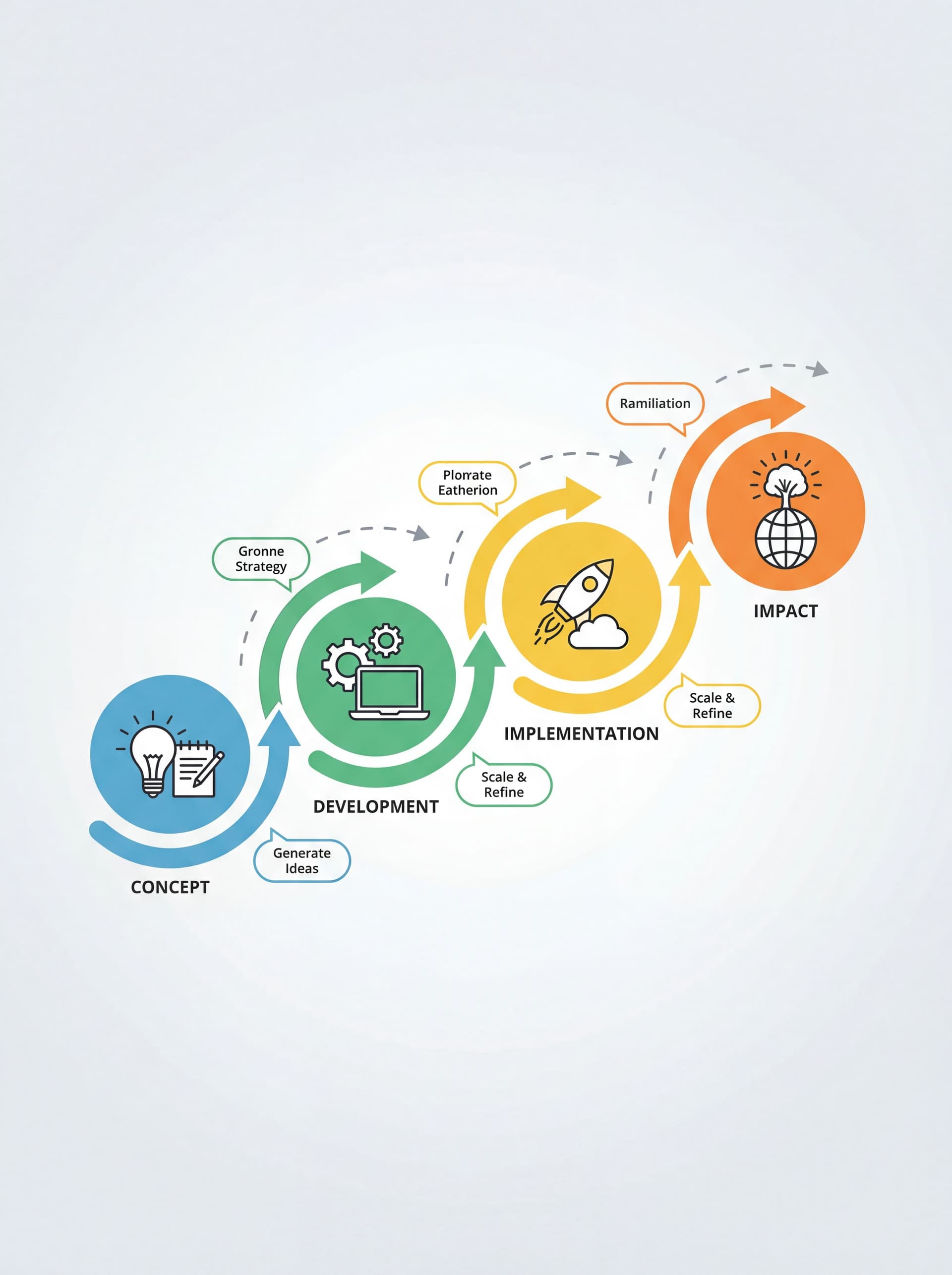
From idea to reviewed video

010203

Describe the training scenario

Type the workplace situation, safety procedure, onboarding walkthrough, or compliance scenario.

Choose your model and style

Describe the environment, role and correct action.

Deploy to your LMS

Obtain expert review and test captions and playback in your LMS.

01

Describe the training scenario

Type the workplace situation, safety procedure, onboarding walkthrough, or compliance scenario.

02

Choose your model and style

Describe the environment, role and correct action.

03

Deploy to your LMS

Obtain expert review and test captions and playback in your LMS.

Why L&D Teams Switch to AI Video

Model choice

Check supported inputs and available settings for your scene.

Controlled experiments

Change one variable per attempt and keep the selected version.

Review before publishing

Your workforce spans multiple countries and separate training videos per region multiply costs 3-5x, so most companies settle for English-only. AI visuals are language-neutral. Generate universal scenarios, then add localized voiceover or subtitles per office.

Platform 1Platform 2Platform 3Platform 4Platform 5Platform 6
Describe scenes with textSupported image inputsReview before publishing

Built for L&D Teams

Module planning

Limit each clip to one behavior or task.

Module planning

Procedure updates

Identify changed steps and review the corresponding scenes.

Procedure updates

Realistic Workplace Scenarios

Warehouse floors, hospital rooms, retail stores, office cubicles, construction sites. Environments your employees recognize.

Realistic Workplace Scenarios

LMS checks

Test the video file in your learning system; it is not automatically a SCORM package.

LMS checks

Compare ways of working

Evaluate the production method for your project.

Feature
Muvi
Editing tools
External production
Starting pointPrompt and supported referenceSource footageProduction brief
CostDepends on model, settings and creditsDepends on tools and editingDepends on quote and scope
Visual reviewCheck the outputCheck sources and editCheck the delivery
CapacityConfirm account limitsPlan the workloadDiscuss capacity with the team
VariationsChange the prompt and reviewAdjust the editAgree the revision scope
Editing, approval and publishing preparation need planning with every method.
Compare costs and delivery scope for your actual project.
Muvi
Starting pointPrompt and supported reference
CostDepends on model, settings and credits
Visual reviewCheck the output
CapacityConfirm account limits
VariationsChange the prompt and review
Editing tools
Starting pointSource footage
CostDepends on tools and editing
Visual reviewCheck sources and edit
CapacityPlan the workload
VariationsAdjust the edit
External production
Starting pointProduction brief
CostDepends on quote and scope
Visual reviewCheck the delivery
CapacityDiscuss capacity with the team
VariationsAgree the revision scope
Editing, approval and publishing preparation need planning with every method.
Compare costs and delivery scope for your actual project.

Generate, Not Produce.

Start by checking the right model and your current access.

Describe scenes with textSupported image inputsReview before publishing
Create video
Education Videos

Education Videos

Explainer Videos

Explainer Videos

AI Agent & Workflow Integration

AI Agent & Workflow Integration

Frequently Asked Questions

  • Visuals are drafts; a qualified reviewer must validate regulations and procedures.

  • Confirm current team and account options rather than assuming shared-password access.

  • Use approved references and briefs, then compare environments and equipment between modules.

  • A video file is not a SCORM package. Test LMS upload and any required packaging separately.

  • Describe the environment and have safety-critical actions reviewed by a qualified specialist.

さらに探索

  • AIモデル20以上のAI動画・画像モデルを探索
  • モデル比較AIモデルの直接比較
  • プロンプトガイドすぐに使えるプロンプト構成
  • 代替サービスmuvi.videoとの比較
  • ブログAI動画の活用ガイドとチュートリアル
  • AIエフェクト試してみたい話題のAIエフェクト
見つける
見つける
作品
作品
ライブラリ
ライブラリ
アカウント
アカウント

現実を超えた創造を

作成

  • スタジオ
  • 動画作成
  • 開始&終了フレーム
  • 参照から動画
  • 画像生成
  • ワークフローエディター
  • マイワークフロー

リソース

  • ブログ
  • すべてのプロンプトガイド
  • 絵コンテ用プロンプト
  • ホラー動画プロンプト
  • シネマティックライティングプロンプト

AIモデル

  • すべてのモデル
  • Seedance 2.0
  • Google Veo 3.1
  • Kling 3.0
  • Wan 3.0
  • Gemini Omni Flash

見つける

  • AI動画ジェネレーター
  • AI画像生成
  • テキストから動画
  • 写真から動画
  • AI映画メーカー

活用事例

  • すべての活用事例
  • Instagram動画
  • YouTube動画
  • Facebook動画
  • TikTok動画
  • ブランドマーケティング
  • Instagram動画ジェネレーター
  • 商品動画ジェネレーター
  • 広告動画ジェネレーター

会社概要

  • 料金プラン
  • API
  • Muviクリエイタープログラム

比較

  • すべての比較
  • Seedance vs Sora
  • Kling vs Sora
  • Pika vs Luma
  • テキストから動画モデル
  • Muvi vs Runway
  • すべての代替サービス
  • Runwayの代替
  • Higgsfieldの代替

法的情報

  • プライバシーポリシー
  • 利用規約
  • クッキー通知

AI エフェクト

  • すべてのエフェクト
  • Trending
  • Editor's Pick
  • Behind the Scenes
  • No date? Fixed
  • Commercials
  • Architecture & Interiors
  • Couple Goals
  • Must Try Photos
  • Couple Lab
  • Cinematic
  • Portrait
  • AI Pranks

言語

  • English
  • Türkçe
  • Español
  • Deutsch
  • 日本語
  • Français
  • Português
  • 한국어
  • Italiano
support [at] muvi.video

Üniversiteler Mahallesi, 1597.Cadde No: 3/104 Çankaya/Ankara

112 Capitol Trail Suite, A3502 Newark, DE 19711, PixelByte, LLC

© 2026 Muvi AI™. 全著作権所有。

  • Google Play
  • Instagram
  • X / Twitter
  • YouTube
  • LinkedIn